Description
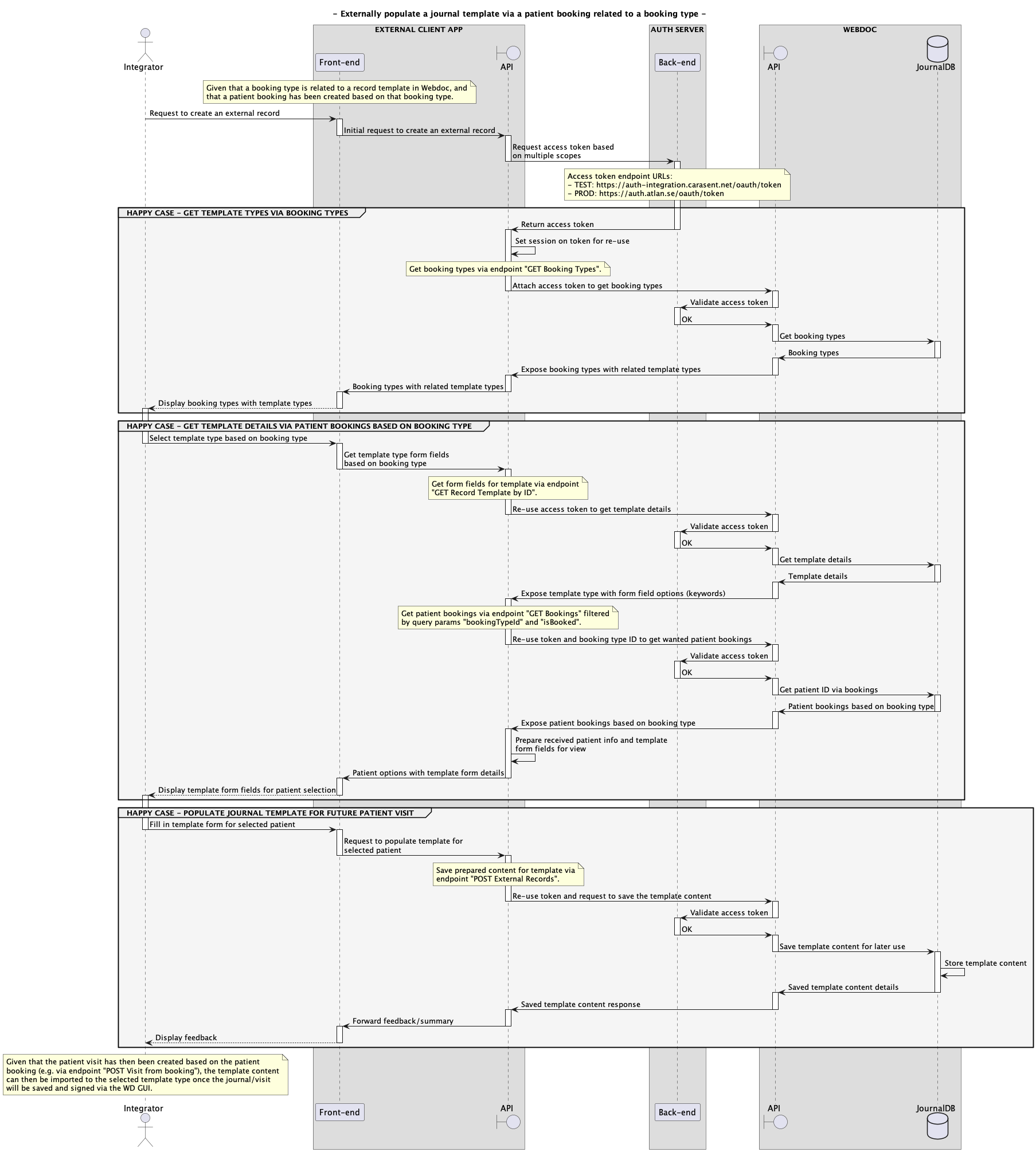
To be able to fulfill a request to externally populate a record template in Webdoc, which can later be imported to a journal after a patient visit registration, there are a few endpoint calls to go through in order to get and post all necessary data.
This tutorial describes the chain of API calls necessary to fulfill the entire flow from getting the required data to populate a record template, and how its content can later be imported to a journal after a visit registration - based on a booking type - in the context of Webdoc (WD). Furthermore, the authorization necessary through this flow is based on the "OAuth 2.0" protocol.
All in all, the REST API endpoints included in this entire context flow are the following:
-
GET /v1/bookingTypes
(To get the template ID for the latest version of a record template related to a booking type.) -
GET /v1/recordTemplates/{templateId}
(To get the keyword IDs for the record template to be able to populate to the correct form fields in the template.) -
GET /v1/bookings?isBooked=1&bookingTypeId={bookingTypeId}
(To get patient and booking data via bookings related to a specific booking type.) -
POST /v1/externalRecords
(To create the contents for the template, which can later be imported to populate a journal after a visit registration.) -
POST /v2/visits
(To register the visit based on the patient booking.)
Prerequisites
- API credentials must be configured in the WD auth server, such as a client ID along with a client secret and scopes, etcetera (each client ID is unique for each WD system).
- The grant_type "client_credentials" must be used in order to request a valid access token for this context.
- To fulfill the whole API flow for this tutorial context using the same access token, the token must be based on the scopes: "system-admin", "bookings:read", "patient:read", and "self-service".
-
A record template type for "visit" must exist in the WD system. Visit templates can be
managed via the Webdoc GUI through the menu path: "Administratör > Inställningar >
Mallar > Journalformulär".
Moreover, the correct template type can then be created via option: "Nytt formulär > Formulärtyp 'Besök'". -
At least one booking type must exist in the WD system. Booking types can be managed via the
Webdoc GUI through the menu path: "Administratör > Inställningar > Bokningar > Ange
bokningstyper".
-
Given that the booking type and visit template are created: The selected booking type must
be related to the selected visit template. This can be managed via the Webdoc GUI through
the menu path:
"Admininstratör > Inställningar > Bokningar > Ange bokningstyper".
Then click on the cogwheel to edit the selected booking type and select the visit template in the dropdown list for "Förvalt journalformulär". - A patient booking related to the selected booking type must be created in the WD system (either via the calendar through the WD GUI or externally via "POST Bookings").
Workflow 1 - Steps to receive an access token to create an external record with imported content to a journal after a visit
-
To issue an access token that can be used through the entire chain of API calls necessary to create an external record template with content to be imported to a journal after a visit registration, the following API credentials can be used:
- Grant type: client_credentials
- Scopes: system-admin, bookings:read, patient:read, self-service
Furthermore, you need a client ID and client secret, which will be provided to you by Carasent. Below is an example of how this access token can be requested through CURL having <client_id> and <client_secret> replaced with your client ID name and client secret.
Example CURL - Request an access token for this context for your TEST environment:
    curl -X \
    POST -u "<client_id>:<client_secret>" \
    -d "grant_type=client_credentials&scope=system-admin%20bookings:read%20patient:read%20self-service" \
    https://auth-integration.carasent.net/oauth/token
The requested access token will then be returned in the following JSON format.
Example JSON response - Access token with multiple scopes:
    {
        "access_token": "dbc5051a41f22a70e43432c0db329cc80fbed103",
        "expires_in": 3600,
        "token_type": "Bearer",
        "scope": "system-admin bookings:read patient:read self-service"
    }
Note! An issued access token is valid for one hour.
Workflow 2 - Steps to externally fetch required data to populate a journal template
To be able to map the content to the right template and its form fields, you need to get the correct record template ID with its keyword IDs.
This section describes the endpoints to be called to collect the required data to finally be able to populate a record template before a visit - based on a booking type.
-
Given that you have received a valid access token (via workflow 1), an example to request
the endpoint
"GET Booking Types" to get the latest template ID in which you want
to populate content to can look like below.
Example CURL - Request the latest template ID based on a booking type:
    curl https://api-integration.carasent.net/v1/bookingTypes \
    -H "Accept: application/json" \
    -H "Authorization: Bearer dbc5051a41f22a70e43432c0db329cc80fbed103"
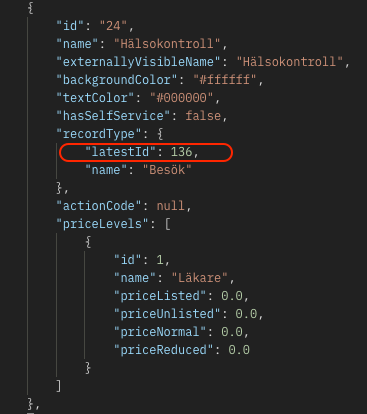
Let's say there is a booking type in Webdoc called "Hälsokontroll" which is connected to a record template of type "visit" that you want to base the content on. Then the response of the latest template ID for this can look like below.
Example JSON response - Fetched record template ID via booking type:
-
Moreover, to get the keyword IDs/form fields for the specific template ID you fetched, you
can call the endpoint
"GET Record Templates by ID"
like in the example below.
Example CURL - Request to get keyword IDs for a template ID:
    curl https://api-integration.carasent.net/v1/templateTypes/136 \
    -H "Accept: application/json" \
    -H "Authorization: Bearer dbc5051a41f22a70e43432c0db329cc80fbed103"
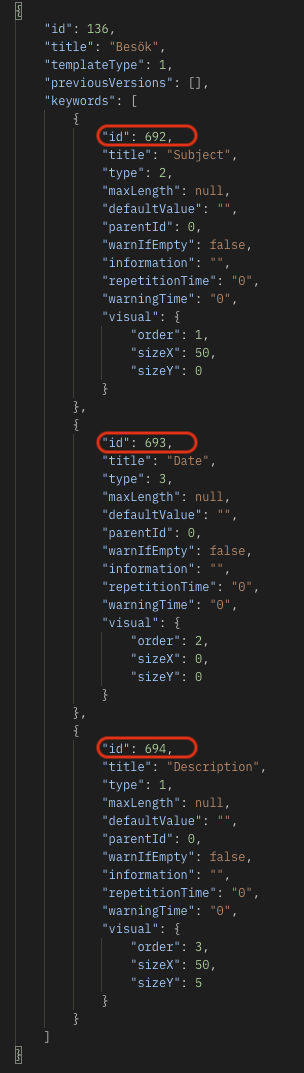
In the below response example, the requested template ID has three keyword IDs/form fields: "Subject" (id: "692"), "Date" (id: "693"), and "Description" (id: "694").
Example JSON response - Keyword IDs based on record template ID:
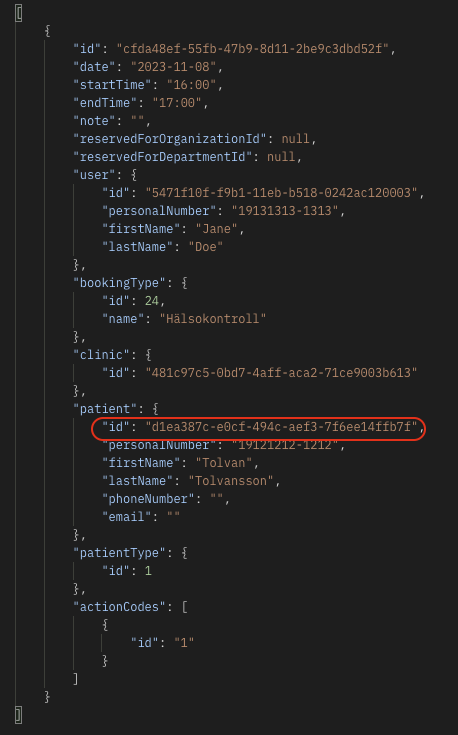
Furthermore, before you can create the external record, you also have to get the patient ID to relate the template and content to. An example request for this can look like below, where the endpoint "GET Bookings" is called with applied query parameters to limit the bookings by patient bookings based on the booking type ID (see "id" in JSON response from step 1).
Example CURL request - Get patient ID based on booking related to a booking type:
    curl https://api-integration.carasent.net/v1/bookings?isBooked=1&bookingTypeId=24 \
    -H "Accept: application/json" \
    -H "Authorization: Bearer dbc5051a41f22a70e43432c0db329cc80fbed103"
Note! To limit the booking response further in this case, you can also utilize additional query parameters such as "fromDate" and "toDate". Example:
https://api-integration.carasent.net/v1/bookings?bookingTypeId=24&isBooked=1&fromDate=2023-11-08&toDate=2023-11-08Example JSON response - Fetched patient ID via bookings related to a booking type:
Workflow 3 - Steps to externally create a record and import the content after visit registration
Once all required data is collected (via workflow 2), you can finally create the external record with applied content.
This section describes the endpoints to be called to create the external record with added content, which is later imported to a journal after a visit registration - based on the previously scheduled patient booking.
-
Given that you have received a valid access token (via workflow 1), an example to create
the external record with appended content via endpoint
"POST External Records" can look like below.
Example CURL - Create an external record with appended content:
    curl --location --request POST 'https://api-integration.carasent.net/v1/externalRecords' \
    --header 'Authorization: Bearer dbc5051a41f22a70e43432c0db329cc80fbed103' \
    --header 'Content-Type: application/json' \
    --data \
    '{
       "patientIdentity": "d1ea387c-e0cf-494c-aef3-7f6ee14ffb7f",
       "recordTemplateId": 136,
       "keywords": [
         {
           "id": 692,
           "value": "A subject here..."
         },
         {
           "id": 693,
           "value": "2023-11-13"
         },
         {
           "id": 694,
           "value": "A description here..."
         }
       ]
    }'
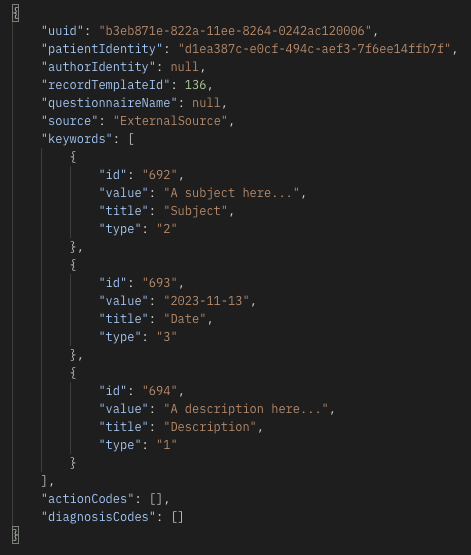
Example JSON response - Created external record based on collected values:
-
Once the external record is created, it means that the content is saved to be imported later to the journal template related to the booking type that the patient booking is based on.
However, before you can import the content to the journal, the patient visit must be registered based on the record template in which the content was pre-created for, i.e. because the journal cannot exist in WD without the visit.
The visit registration based on the patient booking can be done via the endpoint "POST Visit from booking" (for instance during a patient arrival registration via a terminal) in which the request can look like below.
Example CURL - Register a patient visit based on a patient booking:
    curl --location --request POST 'https://api-integration.carasent.net/v2/visits' \
    --header 'Authorization: Bearer dbc5051a41f22a70e43432c0db329cc80fbed103' \
    --header 'Content-Type: application/json' \
    --data \
    '{
       "bookingId": "cfda48ef-55fb-47b9-8d11-2be9c3dbd52f"
    }'
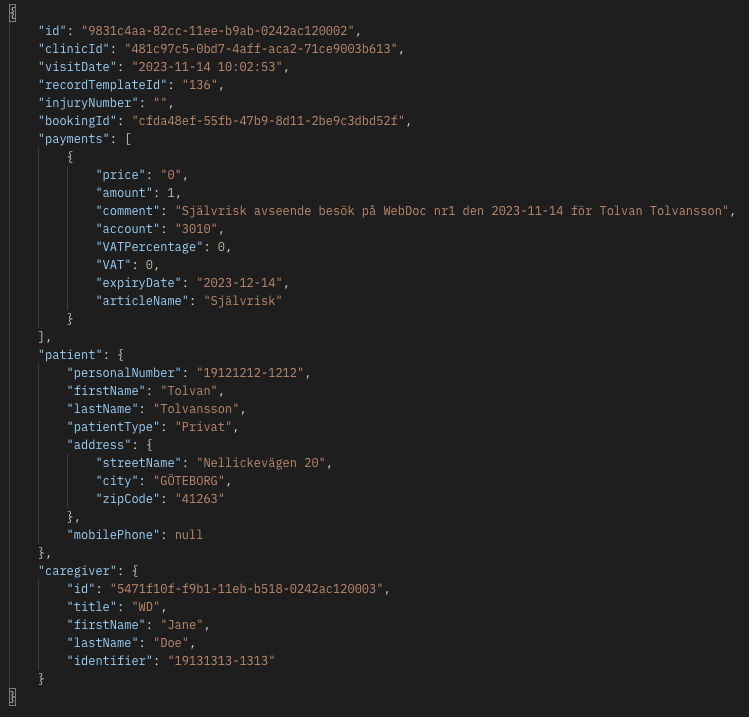
When the visit is successfully created, you can expect a response like in the below example.
Example JSON response - Registered patient visit based on a patient booking:
-
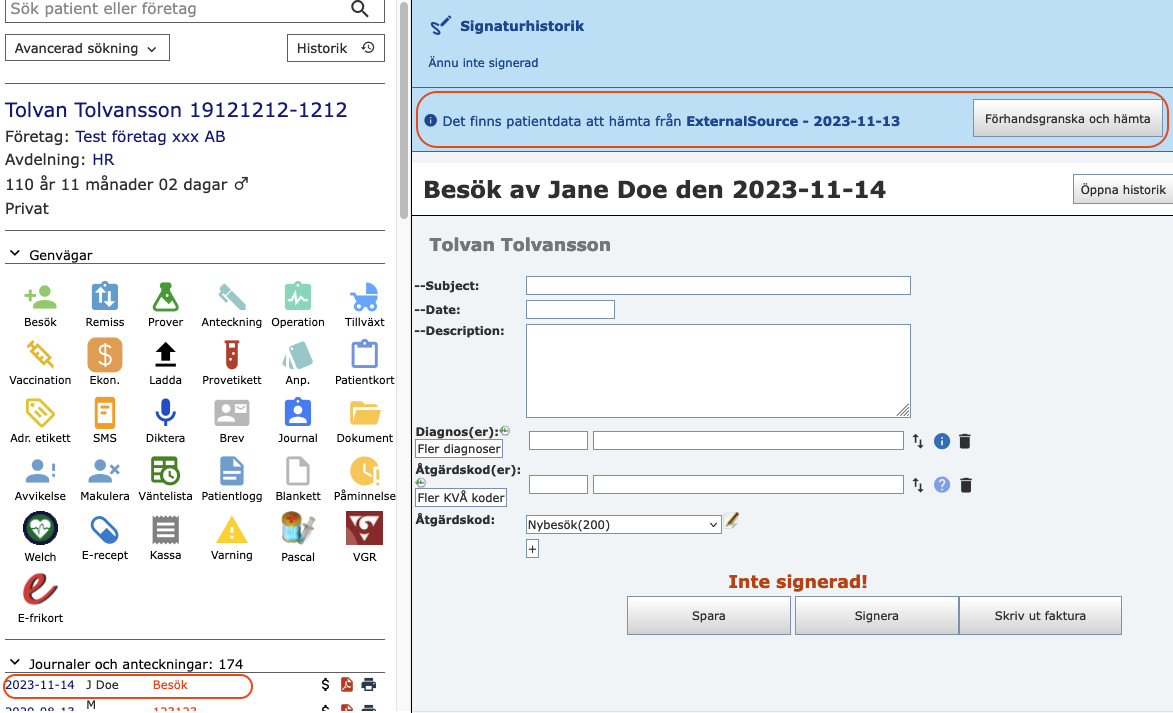
Finally, the external record template content is now ready to be imported in the created journal via the WD GUI once the visit is ready to be saved and signed.
Screenshot - Import externally created journal content via WD GUI:
Context flow
The below sequence diagram illustrates the necessary sequence flow for this entire context (click on the image to see it in original size):