Description
To enable interaction with Webdoc's different REST APIs, you have to verify that you have permissions to do so. Moreover, the authorization used to manage the API permissions in Webdoc is based on the standard protocol "OAuth 2.0".
This page describes the necessary steps to enable interaction with Webdoc's different REST APIs using the OAuth 2.0 grant type "client credentials". Moreover, the grant type "client credentials" does not require the presence of a logged in Webdoc user (as in the SSO flows: Webdoc SSO with external services or Webdoc SSO with "PUT Current Patient").
Prerequisites
- API credentials must be configured in the WD auth server, such as a client ID along with a client secret and scopes, etcetera. These credentials will be setup and provided to you by Carasent.
Workflow 1 - Steps to receive an access token based on grant type "client credentials"
-
Before you can request an access token to interact with Webdoc's REST APIs, you must have been provided with necessary API credentials from Carasent.
The API credentials provided by Carasent that you need to use when requesting an access token for the basic API authorization are the following:-
client_id
(The client ID is a unique string value which can be seen as a username.) -
client_secret
(The client secret is a hashed string which can be seen as a password.) -
grant_type
(The available grant types used within the context of WD are: "client_credentials", "authorization_code", or "refresh_token". What grant type you can use depends on what grant types that have been configured by Carasent for your client ID. Moreover, for the basic authorization flow in scope of this tutorial, the required grant type would be "client_credentials".) -
scope
(Scopes are string values that must be used to grant access to specific endpoints. Each endpoint ca be considered a scope of Webdoc to access, so depending on the endpoints you want to access, you must request an access token based on valid scopes accordingly. You can read more about available Webdoc scopes on Carasent's public REST API documentation page.)
-
client_id
-
Let's say you want to get bookings from Webdoc via Webdoc's REST API. In order to do so, you can request the endpoint "GET Bookings". In turn, that endpoint requires the scope "bookings:read" or "bookings:write", which means that you need to issue an access token based one of those scopes.
Moreover, a caregiver does not have to be logged in to WD in order for this kind of information to be exposed via the WD REST API. In other words, the only relevant grant type to use for this token would then be "client_credentials" (in contrast to the grant type "authorization_code" or "refresh_token" used within WD SSO).
A request to issue an access token to be used to grant access to the endpoint "GET Bookings" can look like below - having <client_id> replaced with your client ID name and <client_secret> with your secret value.
Example CURL request - Request an access token to get bookings from your WD TEST environment:
curl -X \ POST -u "<client_id>:<client_secret>" \ -d "grant_type=client_credentials&scope=bookings:read" \ https://auth-integration.carasent.net/oauth/token -
The requested access token will then be returned in the following JSON format.
Example JSON response - Access token based on grant type "client_credentials":
    {
        "access_token": "dbc5051a41f22a70e43432c0db329cc80fbed103",
        "expires_in": 3600,
        "token_type": "Bearer",
        "scope": "bookings:read"
    }
Note! An issued access token is only valid for one hour.
Workflow 2 - Steps to get bookings with attached access token
-
Once you have received a valid access token to get bookings via the Webdoc API, you can request to get the bookings by attaching the access token like in the below example request.
Example CURL request - Get bookings from your WD TEST environment with attached token:
curl https://api-integration.carasent.net/v1/bookings \ -H "Accept: application/json" \ -H "Authorization: Bearer dbc5051a41f22a70e43432c0db329cc80fbed103" -
Once you have attached a valid access token, you can then expect to get Webdoc bookings returned in JSON format. You can see examples of expected JSON responses via the "GET Bookings" endpoint documentation under "Example response" by changing the option "JSON Schema" to "Bookings".
Context flow
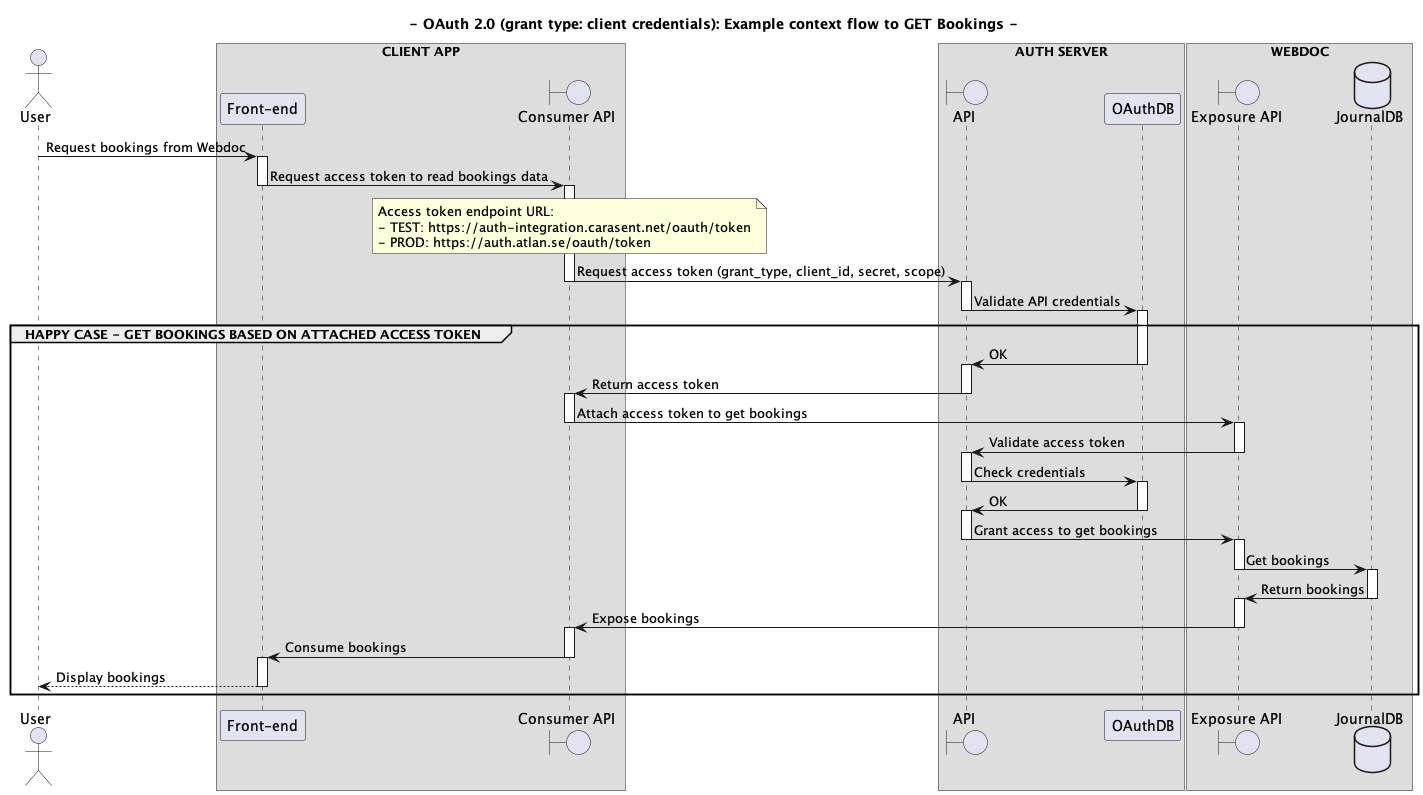
The below sequence diagram illustrates the necessary sequence flow to request an access token used to get bookings via a WD REST API (click on the image to see it in original size):